Specify Page Margins in Print Preview
To set document page margins, do one of the following.
Use the Page Setup dialog
In the Page Setup dialog, enter the required top, left, bottom and right page margins' values into the appropriate editors.
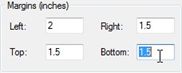
Then, click OK to save changes.
Use drag-and-drop in the Print Preview window
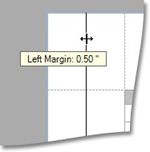
To use this approach, point to the dotted line indicating the margin's border. When the pointer changes to  , drag the pointer to move the margin.
IMPORTANT
When saving or using a saved preview file (.prnx file ) you can not edit or change the page settings ( pagesize, margins etc.) The page setup button will be disabled.
|