The Load Surplus Bonuses permits RHOP to keep a history of the Surplus Bonuses provided to Members
The main display table list all files loaded in RHOP.
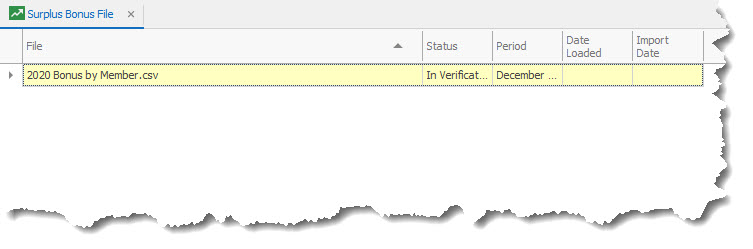
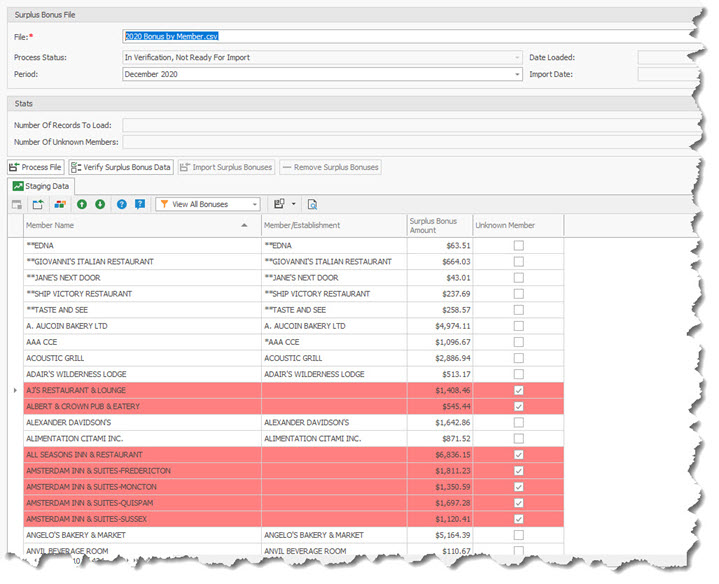
By opening one of the files displayed you will be able to review by Member the Surplus Bonus Amount distributed and any Unknown Member identified.
Unknown Members represent the Member Name (first column in Staging Grid tab ) that do not match with the RHOP Member/Establishment name (second column) stored in the database. If the spelling of the Member Name matches, the Bonus Surplus is automatically linked to the member profile matching the Member Name of the import file.
The User must click in the unknown blank Member/Establishment field and select the appropriate member from the drop down that represents the Member Name used in the first column of the grid. This permits the Surplus Bonus to be linked with the correct RHOP Member/Establishment profile.
To load a new Surplus Bonus file select the New  button to create a new upload record.
This action will display the entry screen to load the New Surplus Bonus File. The file must contain all the members eligible, to attribute the amount to each member.
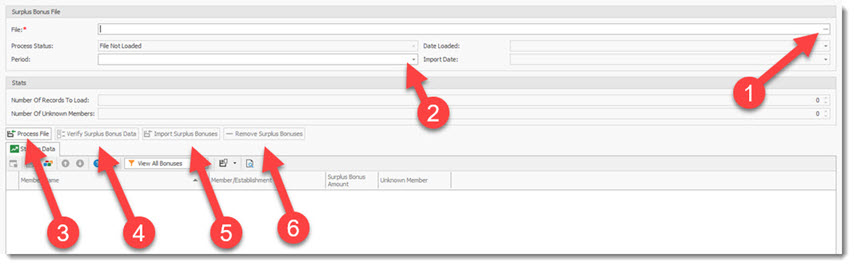
To load a file : (note only the button(s) of the available action for the stage of the file upload are active)
1) Select the file to be loaded
2) Enter the Period for the file
3) Process the File
4) Verify the file: review which member (active and unknown) will receive a bonus amount
5) Import Surplus Bonus File into RHOP
6) If an error is found you can remove (unload) the Surplus Bonus file
Import Surplus Bonuses file Format
The import Surplus Bonuses file format is as follows:
Column #1 Member Name
Column #2 Amount