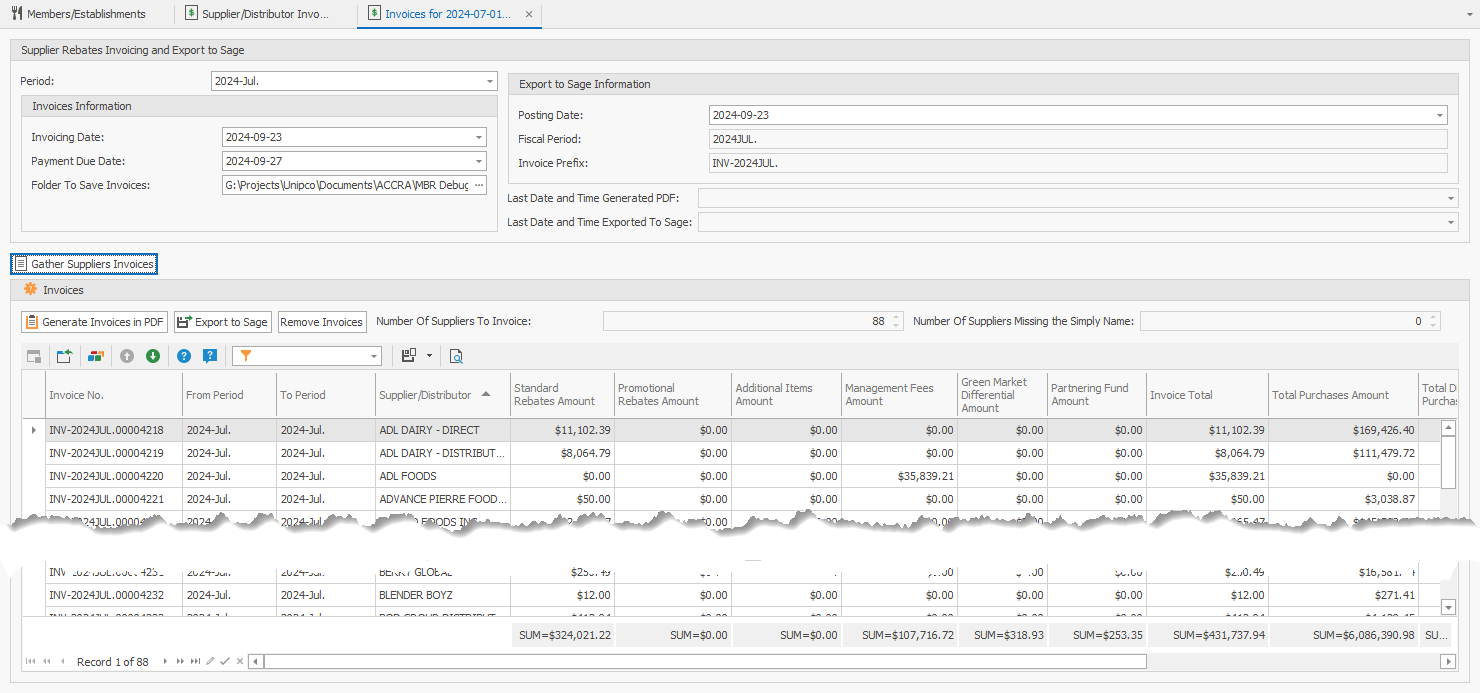
Here you will be able to gather and assemble the supplier/distributor invoices.
Field definitions:
•Period: The ending period that will be used to gather the rebates based on the invoicing frequency selected for the supplier.
oHere are some examples of how the invoices are gathered and assembled:
▪Chosen Period = June 2024:
oMonthly invoicing frequency: Starting period= June 2024, ending period = June 2024
oDirect invoicing frequency: Same as Monthly
oNot Selected invoicing frequency: Same as Monthly
oQuarterly invoicing frequency: Starting period= April 2024, ending period = June 2024
oSemi-Annual invoicing frequency: Starting period= January 2024, ending period = June 2024
oAnnual invoicing frequency: Will not be included, because the ending period is not the month of December
▪Chosen Period = July 2024:
oMonthly invoicing frequency: Starting period= July 2024, ending period = July 2024
oDirect invoicing frequency: Same as Monthly
oNot Selected invoicing frequency: Same as Monthly
oQuarterly invoicing frequency: Will not be included, because the ending period doesn't fall on one of the following months: March, June, September or December
oSemi-Annual invoicing frequency: Will not be included, because the ending period doesn't fall on one of the following months: June or December
oAnnual invoicing frequency: Will not be included, because the ending period is not the month of December
•Invoices Information:
oInvoicing Date: Invoice Date to appear on the invoices
oPayment Due Date: The payment due date that will appear on the invoices
oFolder To Save Invoices: Select thee folder where the invoices PDFs will be saved when pressing the button Generate Invoices in PDF.
•Export to Sage Information:
oPosting Date: The posting date used in the Sage export file.
oFiscal Period: (automatically generated) Text representation of the period to be used when assembling the Sage export file
oInvoice Prefix: (automatically generated) The prefix for the generated invoice number that will be used to identify the invoice. This generated number will be used in the invoices sent to the suppliers. This number will also be used in the export to Sage file to serve as a link between RHOP and Sage, and also as the Sage invoice number.
•Last Date and Time Generated PDF: This is the most recent date and time that the Generate Invoice in PDF was executed successfully.
•Last Date and Time Exported To Sage: This is the most recent date and time that the Export To Sage was executed successfully.
•Number of Suppliers To Invoice: Represents the number of suppliers/distributors that are to be invoiced for the chosen period.
•Number of Suppliers Missing the Simply Name: Represents the number of suppliers/distributors that do not have a Simply Name entered.
Buttons:
•Gather Suppliers Invoices: Once all the information has been entered above the button, you can press on this button to gather, assemble and calculate the invoices for the applicable suppliers.
•Generate Invoices in PDF: After executing Gather Suppliers Invoices, you can generate the invoices in PDF. The invoices will be saved to the folder that you selected in the field Folder To Save Invoices.
•Export to Sage: After executing Gather Suppliers Invoices, you can export the invoices to a Sage export file. You will be prompted to enter the path and file name to where the export file will be saved.
•Remove Invoices: This will allow you to remove the invoices from RHOP.
Related help:
•Gather Supplier/Distributor Invoices