Hide Gridlines and Headings
The Spreadsheet allows you to hide gridlines and headings that are displayed on a worksheet by default.
In the Show group within the View tab, uncheck the Gridlines check box to hide gridlines on a worksheet.
To hide the column and row headers, uncheck the Headings check box.
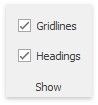
To display gridlines and headers, select the Gridlines and Headings check boxes, respectively.