Customize Printing Settings of Charts
If allowed by your application vendor, you can customize additional print settings of a document. For example, if you are about to print out a chart, you may be able to customize the chart's printing options.
To do this, click the Customize  button on the toolbar. The Print Options dialog will be invoked.
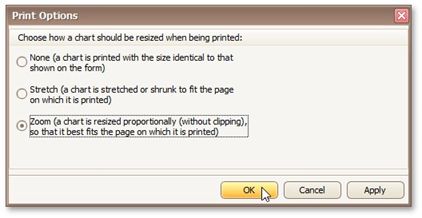
•None
A chart is printed in the same size identical to that shown on the form.
•Stretch
A chart is stretched or shrunk to fit the page on which it is printed.
• Zoom
A chart is resized proportionally (without clipping), so that it best fits the page on which it is printed.