XLSX-Specific Export Options
When exporting a document, you can define XLSX-specific export options using the following dialog.
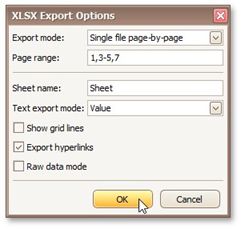
Specifies how a document is exported to XLSX. The following modes are available.
The Single file mode allows export of a document to a single file, without dividing it into pages.
The Single file page-by-page mode allows export of a document to a single file, with each shown in a separate sheet.
The Different files mode allows export of a document to multiple files, one for each document page.
•Page range
Specifies a range of pages which will be included in the resulting file. To separate page numbers, use commas. To set page ranges, use hyphens.
• Sheet name
Specifies the name of the sheet in the created XLSX file.
• Text export mode
Specifies whether value formatting should be converted to the native XLSX format string (if it is possible), or embedded into cell values as plain text.
• Show grid lines
Specifies whether grid lines should be visible in the resulting XLSX file.  Export hyperlinks
Specifies whether to include hyperlinks into the resulting file.
• Raw data mode
Specifies whether to enable the raw data export mode. In this mode, only a document's actual data is exported to XLSX, ignoring non-relevant elements, such as images, graphic content, font and appearance settings.