Hide Fields Using the Context Menu
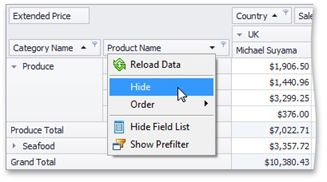
To hide a field, right-click its header and choose Hide from the context menu.
You can also use a Field List to hide fields. To learn more, see Hide Fields Using a Field List.
|
<< Click to Display Table of Contents >> Navigation: User Interface (UI) Elements > Pivot Table > Hide Pivot Table Fields > Hide Fields Using the Context Menu |
Hide Fields Using the Context Menu
To hide a field, right-click its header and choose Hide from the context menu.
You can also use a Field List to hide fields. To learn more, see Hide Fields Using a Field List.