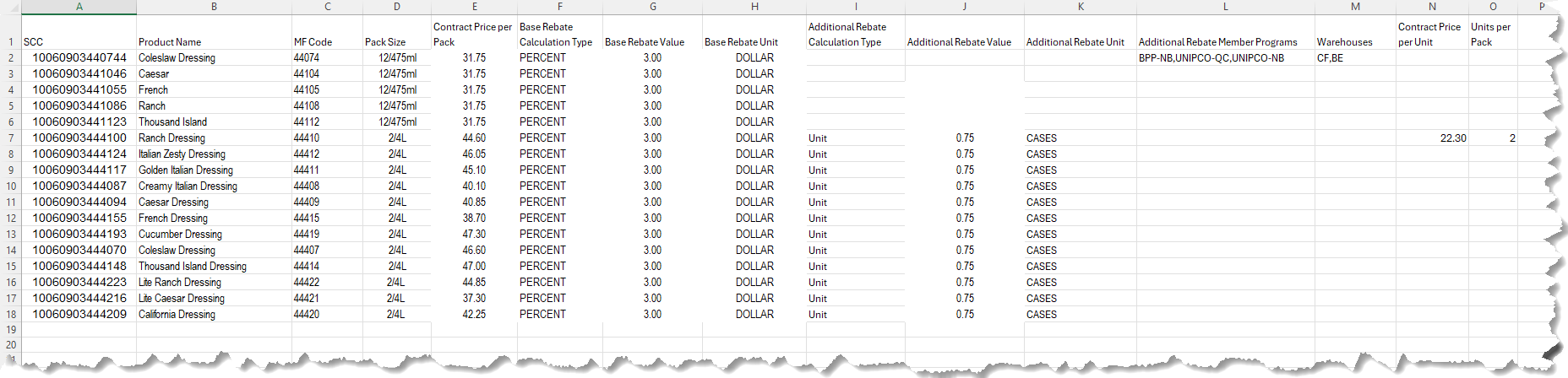
The file should be an Excel .XLSX file. The first line should be the column headers. The effective and expiry dates are not included within the file, because you will have to enter the dates when importing the file into RHOP.
An SCC or an MF Code is required. If neither is included in the file, then the record cannot be matched with a product in the product guide or cannot be used to add a new product to the product guide.
The first row in the file is the column headers. The information that will be loaded are in the second row and thereafter.
The order of the columns in the file is very important.
Columns F through H are optional but should be included as blanks.
Columns I through O are optional but need to be included as blanks.
Columns:
A.SCC: Ensure that the SCC codes do not have the exponential (e.g.: 1.45E+04) and that it is in full. If no SCC is provided, leave the column blank.
B.Product Name/Description
C.MF Code: Supplier Item Number: If no MF Code is provided, leave the column blank.
D.Pack Size
E.Contract Price per Pack
F.*Base Rebate Calculation Type: Accepted values:
1)PERCENT: The additional rebate will be a percentage of the price used for the rebate calculation
2)UNIT: The additional rebate total is calculated by using the method associated with the Rebate Unit Selection, found in column no.9
G.*Base Rebate Value (Only use the General or Numeric formatting in this column, any other formatting will result in an error):
1)Percentage value: If PERCENT is chosen in column F. (i.e.: 3% should entered as 3, not 0.03 and no extra formatting or characters)
2)Dollar amount: If UNIT is chosen in column F. (i.e.: $0.75 should entered as 0.75 and no dollar sign or any other extra characters)
H.*Base Rebate Per Unit Selection: Same choices as the standard rebate choices. In example: CASES, PAIL, LITRES, DOLLARS, KG, LBS, etc.
I.Additional Rebate Calculation Type: Accepted values:
1)PERCENT: The additional rebate will be a percentage of the price used for the rebate calculation
2)UNIT: The additional rebate total is calculated by using the method associated with the Rebate Unit Selection, found in column no.9.
J.Additional Rebate Value (Only use the General or Numeric formatting in this column, any other formatting will result in an error):
1)Percentage value: If PERCENT is chosen in column I. (i.e.: 3% should entered as 3, not 0.03 and no extra formatting or characters)
2)Dollar amount: If UNIT is chosen in column I. (i.e.: $0.75 should entered as 0.75 and no dollar sign or any other extra characters)
K.Additional Rebate Per Unit Selection: Same choices as the standard rebate choices. In example: CASES, PAIL, LITRES, DOLLARS, KG, LBS, etc.
L.Additional Rebate Member Rebate Programs (if applicable): If the additional rebate doesn’t apply to all the member rebate programs that are already assigned to the standard rebate, then it is to list the rebate programs that this additional rebate applies to. The list would have to be comma separated.
M.Warehouses (if applicable): If the product specific contract price only applies to certain warehouses, then it is to list the applicable warehouses. The list would have to be comma separated.
N.Contract Price per Unit (if applicable): This is the contract price for each individual unit within the pack size. If a value is present, then the next column(Units per Pack) is also required.
O.Units per Pack (if Contract price per Unit is present): This is the number of units within the pack size. This value is expected to be a whole number without any decimals. In example: for a pack size of 4/4L, the units per pack would be 4. This value is only required if there is a contract price per unit present in column N.
Notes:
*Columns F through H are not used by RHOP and are only stored for reference information.