To exclude a supplier from the warehouse management fee calculation, please follow the following steps:
1.Select the supplier you want to exclude from the warehouse management fees.
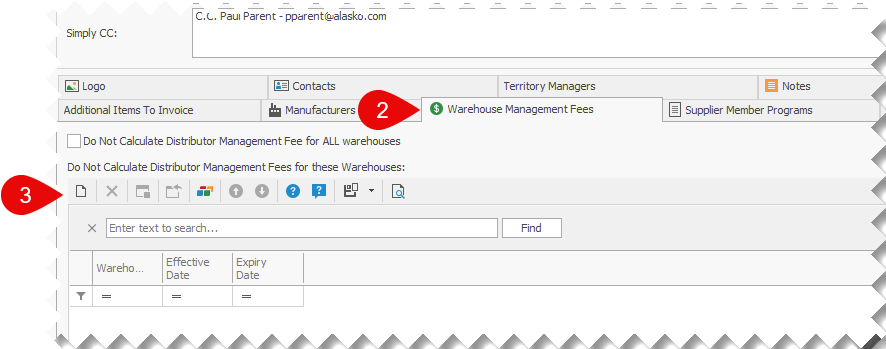
2.Once the supplier information screen is open, scroll down to view the Warehouse Management Fees tab.
3.Click on the New button.
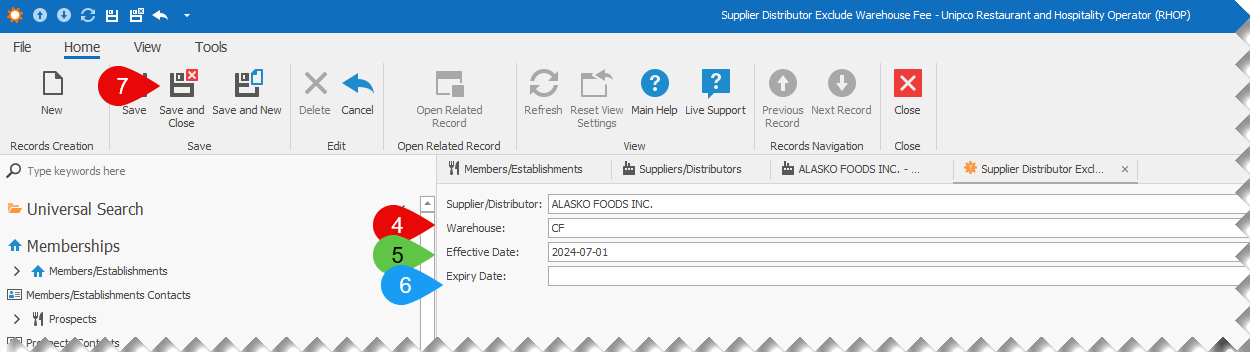
4.In the new exclude from warehouse screen, select the warehouse to exclude from the calculation of warehouse administration fees, for the selected supplier.
5.Select the date that this exclusion comes into effect, in the Effective Date field.
6.(Optional) Select the date this exclusion expires, in the Expiry Date field.
7.Click on the Save and Close button to save the new supplier - warehouse exclusion.