To add or manage warehouse management fees, follow the following steps:
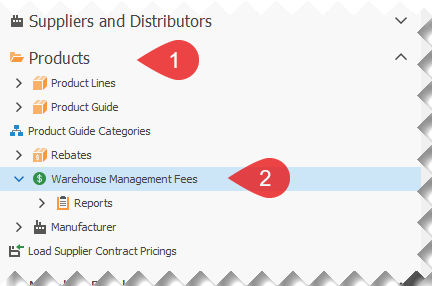
1.Open the Products section in the menu.
2.Open the Warehouse Management Fees list.
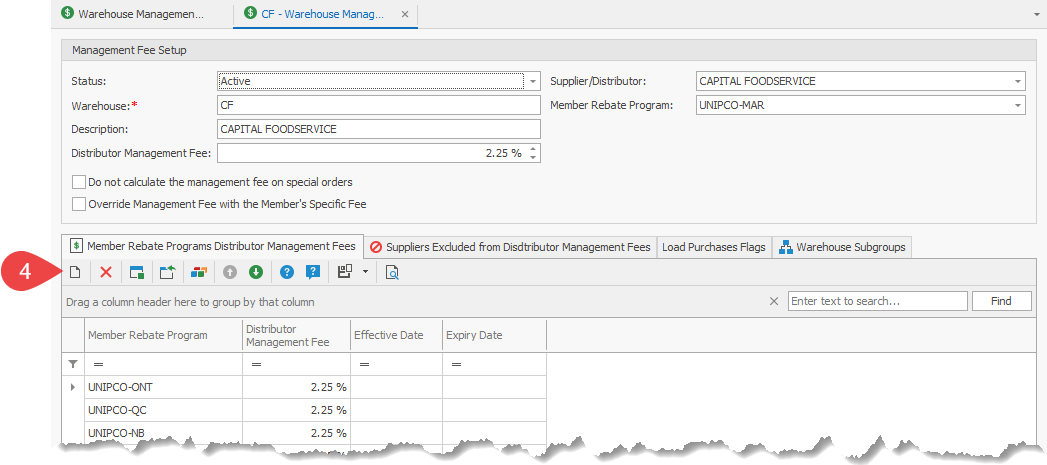
3.Open the warehouse that you want to modify the management fee.
4.Click on the New button, to add a new warehouse management fee entry, for a specific program. A Member Type Warehouse Management Fee screen will open.

5.Select the Member Rebate Program that the management fee is applicable.
6.Enter the Distributor Management Fee, in percent.
7.Enter/Select the Effective Date. The Expiry Date is optional.
8.Click on Save and Close, to return to save the information and return to the previous screen.
9.Repeat steps 4 through 8, for any additional warehouse management fee entries.
10.Do not forget to expire the warehouse management fees that are no longer applicable, after entering the new warehouse management fees. The expiry date for those entries should be the day before the new entry(i.e.: the new entry has an effective date of 01-Aug-2024, the expiry date of the entry to expire would be 31-Jul-2024)