DOCX-Specific Export Options
When exporting a document, you can define DOCX-specific export options using the following dialog:
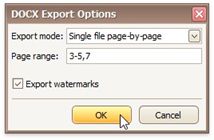
Specifies how a document is exported to DOCX. The following modes are available.
The Single file mode allows export of a document to a single file without dividing it into pages.
The Single file page-by-page mode allows export of a document to a single file divided into pages. In this mode, the Page range option is available.
• Page range
Specifies a range of pages which will be included in the resulting file. Use commas to separate page numbers. Use hyphens to set page ranges.
• Export watermarks
Specifies whether the exported document should include watermarks (if they exist).