Customization
To customize the bookmarks behavior, click the Options drop-down button in the Bookmarks panel, as shown below.
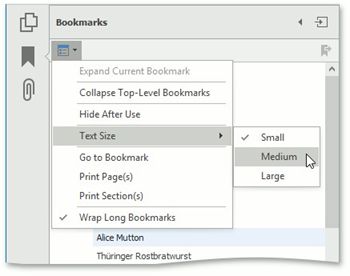
The available options are:
Expand Current Bookmark
Shows all lower-level bookmarks in the Bookmarks panel.
 Collapse Top-Level Bookmarks
Collapses nested bookmarks.
 Text Size
Sets the text size of nodes located in the PDF navigation pane to Small, Medium or Large.
 Go to Bookmark
Goes to a bookmark.
 Print Page(s)
Prints only pages to which selected bookmarks are linked in the document.
 Print Section(s)
Prints a document section corresponding to selected bookmarks.
 Wrap Long Bookmarks
Wraps long lines in the outline node text if the option is checked. If the Wrap Long Bookmarks option is unchecked, shows the outline node text unwrapped in the PDF Viewer.