Formatting Numeric Values
To specify a format for numeric values, select Format from the data item menu.
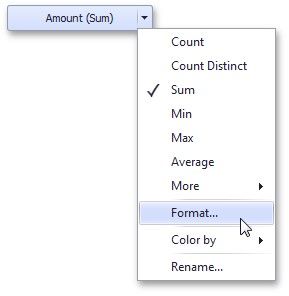
This invokes the Numeric Format window.
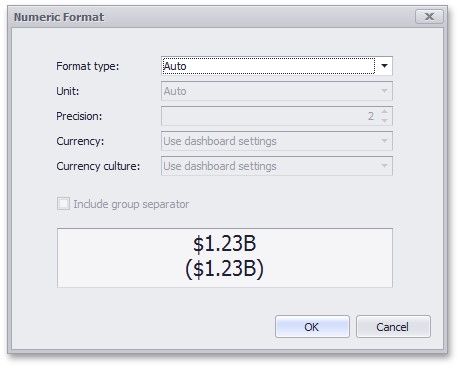
In the Format type field, select the required format type.
FORMAT TYPE |
DESCRIPTION |
Auto |
Format settings are automatically determined based on the data type. |
General |
Converts a number to the most compact of either fixed-point or scientific notation, depending on the type of the number. |
Number |
Converts a number to a string of the "-d,ddd,ddd.ddd…" form where "-" indicates a negative number symbol (if required), "d" indicates a digit (0-9), "," indicates a group separator, and "." indicates a decimal point symbol. |
FORMAT TYPE |
DESCRIPTION |
|
|
Currency |
Converts a number to a string that represents a currency amount. To learn about currency formatting specifics, see the Currency Formatting Specifics section of this document. |
Scientific |
Converts a number to a string of the "-d.ddd…E+ddd" or "-d.ddd…e+ddd" form where each "d" indicates a digit (0-9). |
Percent |
Multiplies a number by 100 and converts it to a percentage string. |
Other format settings are in effect for only specific format types.
SETTING |
DESCRIPTION |
FORMAT TYPES |
Unit |
The unit to which values should be converted. |
Number, Currency |
Precision |
The number of fractional digits that should be displayed. |
Scientific, Percent |
Currency |
Defines the currency sign and format settings that should be used to display currency values. To learn about currency formatting specifics, see the Currency Formatting Specifics section of this document. |
Currency |
Currency culture |
For currencies used in a region with several cultures, specifies the culture that defines format settings. |
Currency |
Include group separator |
Specifies whether or not separators should be inserted between digit groups. |
Number, Currency, Percent |