Calculation Functions Reference
This topic contains the descriptions of window functions that can be used to specify measure expressions.
FUNCTION |
DESCRIPTION |
EXAMPLE |
IMAGE |
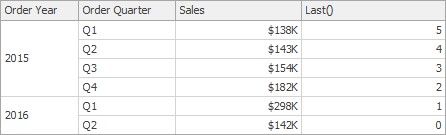
Last() |
Returns the number of rows from the current row to the last row in the window. |
Last() |
|
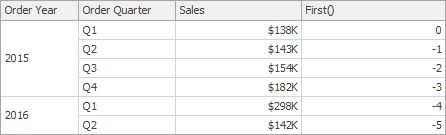
First() |
Returns the number of rows from the current row to the first row in the window. |
First() |
|
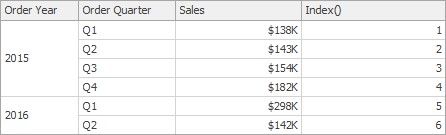
Index() |
Returns the index of the current row in the window. |
Index() |
|
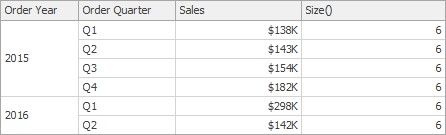
Size() |
Returns the number of rows in the window. |
Size() |
|
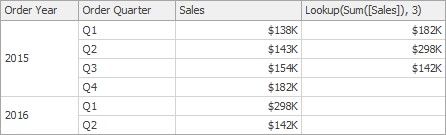
Lookup(SummaryExpression, Position) |
Returns the value of the expression in a target position specified as a relative offset from the current position. |
Lookup(Sum([Sales]), 3) |
|
RankCompetition(SummaryExpression, [ 'asc' |
'desc' ]) |
Returns the standard competition rank for the current row in the window. |
RankCompetition(Sum([Sales]), 'asc') |
RankDense(SummaryExpression, [ 'asc' |
'desc' ]) |
Returns the dense rank for the current row in the window. |
RankDense(Sum([Sales]), 'asc') |
RankUnique(SummaryExpression, [ 'asc' |
'desc' ]) |
Returns the unique rank for the current row in the window. |
RankUnique(Sum([Sales]), 'asc') |
RankModified(SummaryExpression, [ 'asc' |
'desc' ]) |
Returns the modified competition rank for the current row in the window. |
RankModified(Sum([Sales]), 'asc') |
RankPercentile(SummaryExpression, [ 'asc' |
'desc' ]) |
Returns the percentile rank for the current row in the window. |
RankPercentile(Sum([Sales]), 'desc') |
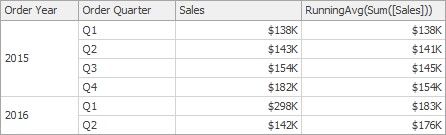
RunningAvg(SummaryExpression) |
Returns the running average of the specified expression from the first row in the window to the current row. |
RunningAvg(Sum([Sales])) |
|
|
|||
FUNCTION |
DESCRIPTION |
EXAMPLE |
IMAGE |
RunningCount(SummaryExpression) |
Returns the running count of the specified expression from the first row in the window to the current row. |
RunningCount(Sum([Sales])) |
- |
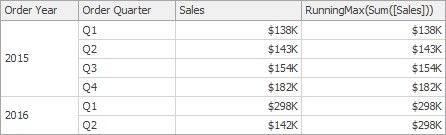
RunningMax(SummaryExpression) |
Returns the running maximum of the specified expression from the first row in the window to the current row. |
RunningMax(Sum([Sales])) |
|
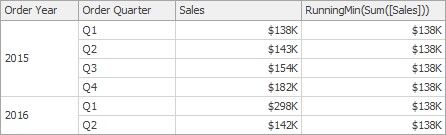
RunningMin(SummaryExpression) |
Returns the running minimum of the specified expression from the first row in the window to the current row. |
RunningMin(Sum([Sales])) |
|
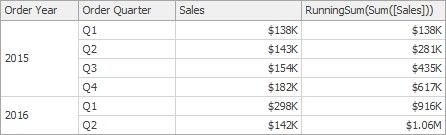
RunningSum(SummaryExpression) |
Returns the running sum of the specified expression from the first row in the window to the current row. |
RunningSum(Sum([Sales])) |
|
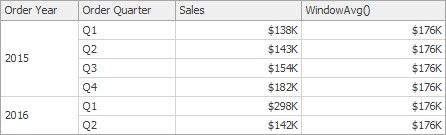
WindowAvg(SummaryExpression, StartOffset, EndOffset) |
Returns the average of the expression within the window, which is defined using offsets from the current row. |
WindowAvg(Sum([Sales]), First(), Last()) |
|
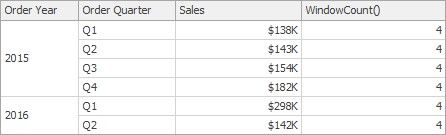
WindowCount(SummaryExpression, StartOffset, EndOffset) |
Returns the count of the expression within the window. |
WindowCount(Sum([Sales]), First()+2, Last()) |
|
WindowCountDistinct(SummaryExpression, StartOffset, EndOffset) |
Returns the distinct count of the expression within the window. |
WindowCountDistinct(Sum([Sales]), First(), Last()) |
- |
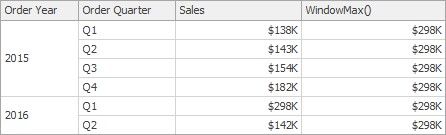
WindowMax(SummaryExpression, StartOffset, EndOffset) |
Returns the maximum of the expression within the window. |
WindowMax(Sum([Sales]), First(), Last()) |
|
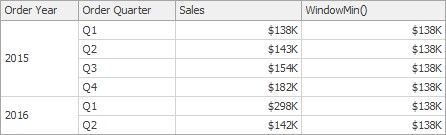
WindowMin(SummaryExpression, StartOffset, EndOffset) |
Returns the minimum of the expression within the window. |
WindowMin(Sum([Sales]), First(), Last()) |
|