The RHOP application is comprised of several functional blocks. The diagram below shows the basic blocks of the RHOP application.
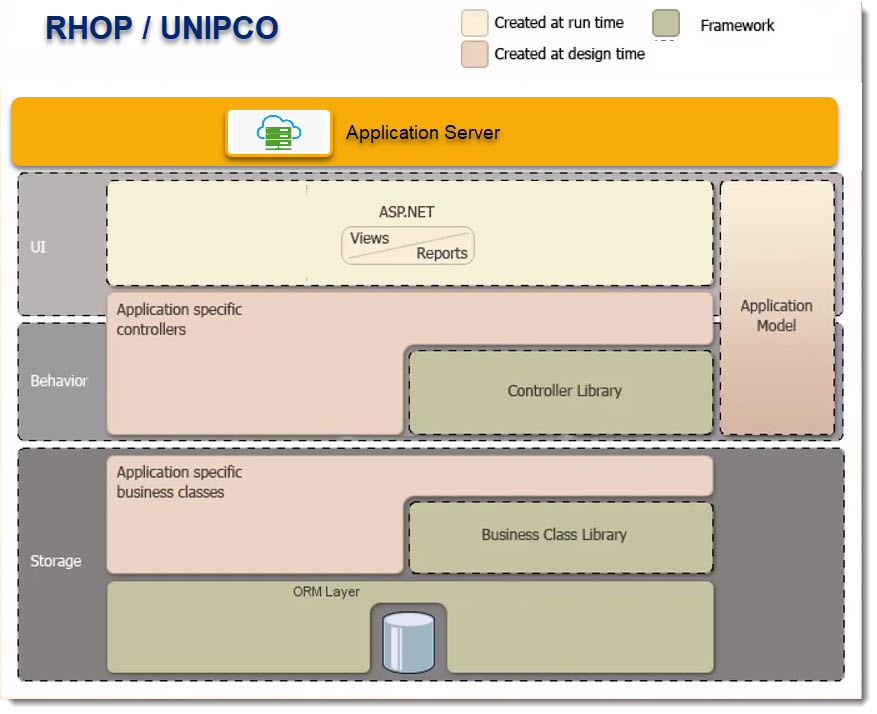
The RHOP applications uses the best practice programming method know as the n-tier model Storage (data layer), Behavior (Business logic), UI (User Interface) and Application Server block to define the application. The N-tier application architecture provides a model by which the application can be flexible and components within the application become reusable. The other main advantage is that the muti-tier application is a true client-server application that can be scaled as required.
The application also uses the Object Oriented Programming (OOP) model. Object-oriented programming is a programming paradigm based on the concept of "Objects", which can contain data and code: data in the form of data fields (often known as attributes or properties), and code, in the form of procedures (often known as methods). RHOP uses and references these terms in the application.
Description of the Application Layers:
Storage Block (Data)
The Storage block manages access to the Database. The Object-Relational Mapping (ORM) Layer contains the logic and connections that manage the database and your data items. For example the object called "Person" manages the data items that make up this object. The Person object can contain data items such as name, last-name, email, birthday, etc.. Another object could be Address which contains the data items City, Country, Full Address, Province, Street, Postal code, etc..
By creating an Object called "Person" and using the object instead of each unique field makes the program easier to manage, less prone to errors and access to the data items simpler for the end user. The user does not have to list every data element they want to use, but rather references the object "person" which automatically gives them access to the data items it contains based on their security and application model controls.
Business Class Library are the programming class that give you access to the various objects such as Person. They contain the interfaces (connectivity logic) needed to connect to the defined objects. The Application specific business classes are the programming classes we defined that are specific to the RHOP application unique business requirements.
Behaviour Block (Business Logic)
The Behaviour block are the specific business logic (how things need to be shown, done or calculated) and controls needed to create your application. The Controller Library are the fundamental controllers (grids, button, labels, etc.) used by the application and stored in the central controller library. The other controllers are controls that are created, modified or specific to a function or logic element within your application. The Application Model are the rules that are enforced on the application. The rules can be related to security, or how to use or access a controller or when an Action needs to be performed. An Action can be a button click, a validation or calculation logic or any other trigger to be executed.
Controllers
Controllers are objects that manage your application's flow. They are also responsible for end-user interaction. The Controllers are mostly responsible for data management. With their help, you can add new records, delete existing ones, perform full text search, etc. For the most part, Controllers serve as containers for Actions.
Application Model
All the information that the application uses to build user interfaces comes from the Application Model. For example, this information includes editor, or labels associated with particular fields. The Application Model is filled with metadata queried from application components - like business objects or Controllers. it controls what you see and are permitted to do.
User Interface (UI) Block
The user interface block is separate from the application business logic block by design. The advantage of this approach is that as UI changes over time or new UI become available or required they can be implemented without affecting the underlining application. The RHOP application provides two(2) interfaces. One for the WEB and one for the Windows Desktop. The Help files for each Interface are slightly different to reflect the UI being used. Older applications did not separate the logic from the User Interfaces which meant major rewrites when any change to the application was required. By separating each block that make up the application one can modify a specific block without impacting the other application blocks. The User Interface chosen is the ASP.Net interface that is fully HTTP version 5 compliant. It contains the Views and reports used by the application.
Views
One of the key features of the Application model is the automatic UI generation based on the application data. There are three types of Views made available in RHOP.
List View
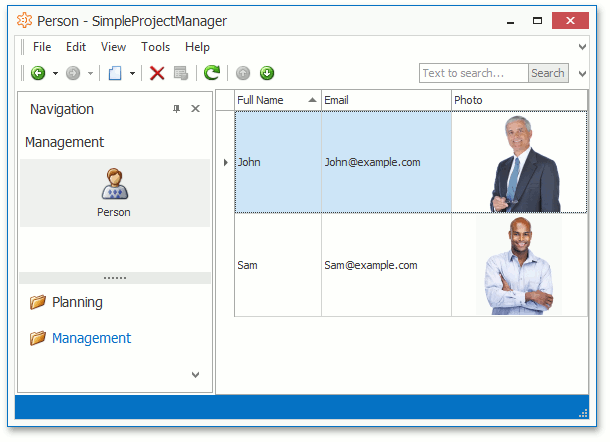
List Views are root modules of your application. Usually, these are grids that display collections that you work with (data tables). In the example below we are using the Person Object (collection). The Grid is displaying basic information on the various persons contained in the database.
Detail View
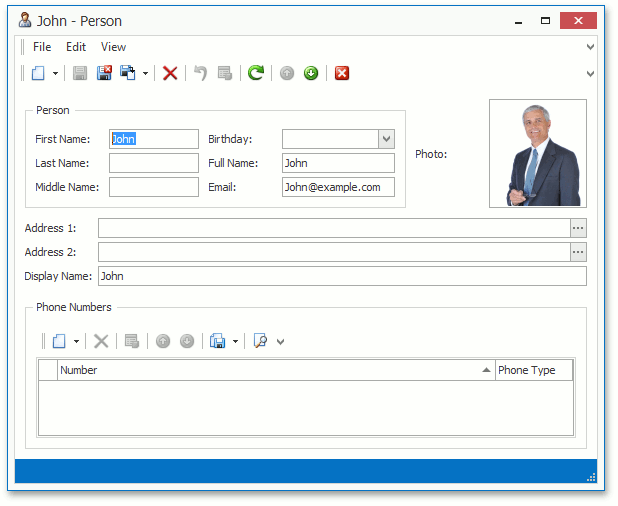
This View type deals with a single object (data record) and presents property values using standalone editors. You see these views when adding a new record or when modifying an existing one.
Dashboard View
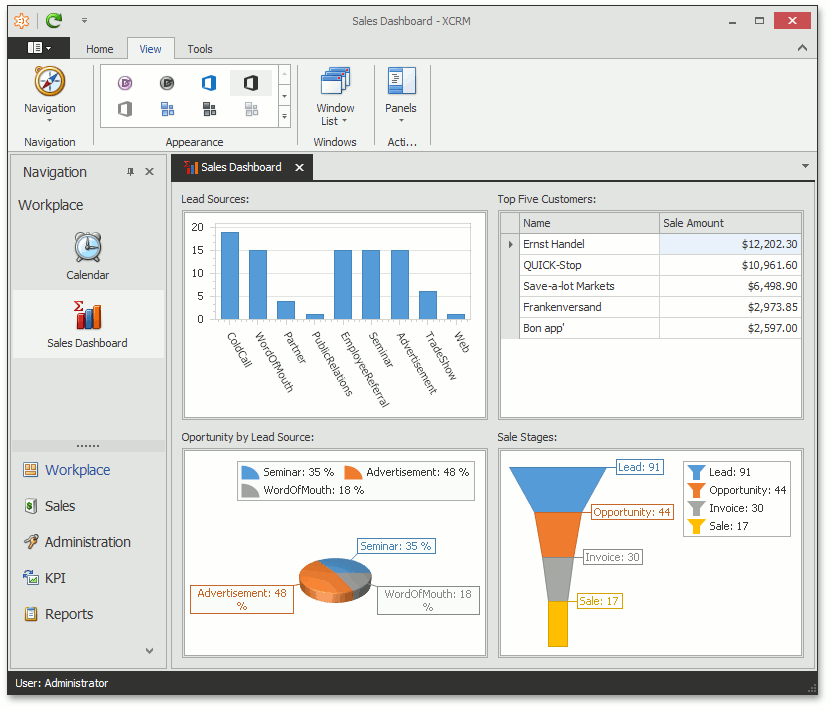
This is a special View type that allows you to display several Views side-by-side on a single screen. It is typically used for analyzing or displaying data in an easy to understand format.
Reports
Business applications are not just used to manage data. It is often useful to analyze trends, problem areas, and resource bottlenecks. And, you might need to have your data report not only on-screen, but also on paper. You can do this using the built-in, fully-functional reporting engine. With its help, you are free to build any reports you need, view them, and of course, print them out.
Application Server
An application server is a server that hosts applications. For RHOP the application server is the Windows IIS Server that is contained in your Windows server. By separating the Application Server from the underlining application, it permits you to scale or move the RHOP application to a new or onto several servers for scalability reasons.